Introduction
“How long does it take to build a mobile app?”
It’s one of the first questions founders ask, and one of the hardest to answer with a single number.
Some agencies say three months, others say six, and a few promise delivery in weeks. In reality, no mobile app is developed under a fixed timeline. Every development is shaped by scope, clarity, decision speed, and technical depth.
A basic utility app does not follow the same path as a marketplace platform. An MVP with limited features moves differently than a product built for scale from day one.
The real question isn’t just how long the mobile app development timeline is, but it’s also around:
- What kind of app is being built
- How prepared is the team before coding begins?
This guide breaks down realistic timelines, phase by phase, and highlights where projects typically accelerate or stall.
Why There’s No Single Timeline for Mobile App Development
No mobile app development process has a fixed timeline.
Wonder why? Because every app is unique and no two apps are developed the same way.
Two applications may appear similar from the outside.
Underneath, the engineering effort can be completely different. A booking app might require live availability syncing, while a delivery platform may require live location access. Similarly, a marketplace app may require assigning roles, managing transactions, and handling disputes within the system.
Each layer adds work… sometimes gradually, sometimes at once. Clarity changes speed more than most teams expect.
When requirements are locked early, and user flows are mapped before development starts, progress tends to be steadier. When features evolve mid-build, timelines stretch. Not dramatically at first, but consistently.
Decision cycles also play a role. Here’s how the timeline changes:
- Revising UI/UX designs based on new directions
- Waiting for approvals within a hierarchy
- Adding “just one more feature.”
These shifts don’t always feel significant, but they contribute to the deliverables as an app is developed. Not to forget, there’s technical depth to the process.
Third-party integrations, payment processing, external APIs, and legacy system connections introduce complexity that isn’t always visible during initial discussions.
The mobile app development process moves through phases, not just coding tasks. How each phase unfolds determines how long the build really takes.
custom mobile app development
Timeline by App Type
Timelines shift less because of screen count and more because of system behavior. What the app does behind the interface determines how long it takes to build.

1. Simple Apps
A simple app isn’t just “fewer features.” It usually means limited user states and predictable behavior.
Examples:
- Content-based apps
- Basic authentication
- Static dashboards
- Minimal backend logic
The key characteristic is low variability. Fewer edge cases. Fewer conditional flows. These builds move faster because the engineering path is clearer. However, design, testing, and deployment still follow full development cycles.
2. Mid-Level Apps
Mid-level apps introduce interaction between users, systems, and data. Think booking platforms, service marketplaces, or role-based applications.
Now you’re dealing with:
- State changes
- Data synchronization
- Notifications
- Payment workflows
- Admin controls
The timeline extends not because of visuals, but because logic multiplies. Every interaction must be tested across scenarios.
3. Complex Apps
Complex apps are systems, not just interfaces. Real-time updates, multi-user dependencies, third-party integrations, scalability planning, analytics layers, and background processing are elements that compound development effort.
When dealing with complex apps:
- Coordination increases
- Testing cycles expand
- Architecture decisions become long-term commitments.
At this level, development isn’t linear; it becomes iterative and layered.
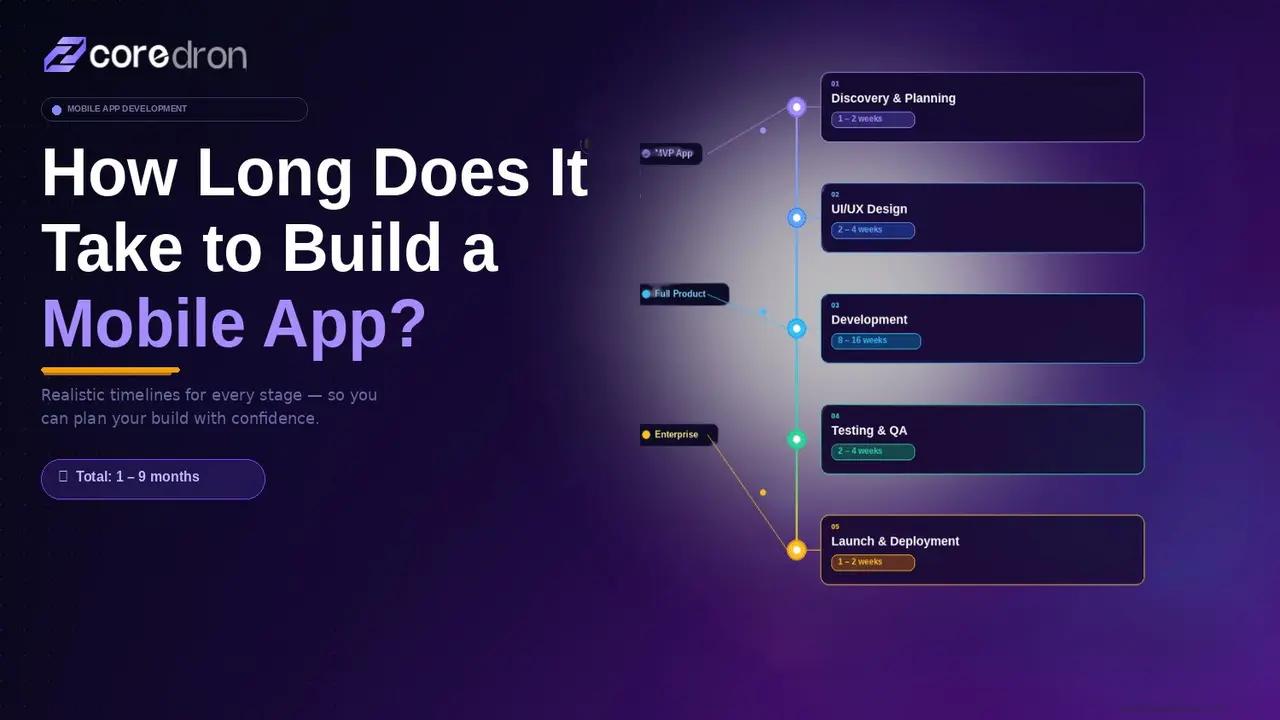
Timeline Breakdown by Phase
An app doesn’t take time solely because of coding. It takes time because decisions move through stages.

Phase I - Discovery & Planning
This phase rarely feels urgent, and that’s why it’s often underestimated.
When requirements are loosely defined, development doesn’t stop. It just becomes reactive. Engineers begin building while clarity is still forming.
That’s where revisions begin.
Clear documentation here doesn’t just guide development. It reduces backtracking later. Projects that move faster usually have stronger alignment at this stage.
Phase II - Design
Design delays don’t always come from complexity. They come from direction shifts. A wireframe revision seems small.
A layout change feels minor. But once development begins, those changes multiply effort. Design approval timing often shapes the real start of engineering, even if the calendar says otherwise.
Phase III - Development
This phase expands when assumptions break. An integration behaves differently than expected. A backend structure needs adjustment.
Edge cases surface once user flows are tested. Complexity rarely announces itself upfront. It reveals itself mid-build.
Phase IV - Testing & Refinement
Testing adds time, not because of bugs, but because of coverage. Here’s what extends the process:
- Different devices
- Different OS versions
- Network conditions
- User paths that weren’t obvious on paper.
Apps that feel stable at launch usually go through uncomfortable refinement cycles here.
Phase V - Deployment & Review
The final leg of app development depends on the dev team's external timelines. Other factors include:
- Processing for review in the App Store before live
- Compliance adjustments
- Last-minute metadata updates
While these factors may appear small, they tend to shift launch by days (sometimes weeks).
Remember, development doesn’t end at submission; it ends at approval.
Timeline Breakdown by Phase
| Phase | What Happens Here | Where Time Is Consumed |
| Discovery & Planning | Requirements defined, features prioritized, technical approach discussed | Scope unclear, shifting priorities, incomplete documentation |
| Design | Wireframes created, user flows validated, UI refined | Late feedback, direction changes after approval, and stakeholder misalignment |
| Development | Frontend and backend built, APIs integrated, infrastructure configured | Unexpected logic gaps, integration issues, and underestimated complexity |
| Testing & Refinement | Bugs resolved, performance checked, device compatibility tested | Edge cases discovered late, multiple device testing cycles |
| Deployment | Store submission, compliance checks, and final approvals | App store review delays, rejected builds, and last-minute metadata changes |
What Actually Slows Mobile App Projects Down?
Projects don’t usually fall behind because someone writes code slowly. They drift when alignment slips.
a. Scope That Changes Midway
Something that looked small during planning rarely stays small.
- A form update connects to validation rules.
- A minor UI shift affects navigation logic.
- A feature addition touches the data structure.
Each change forces small adjustments across layers. It’s rarely dramatic. It’s cumulative.
b. Decision Gaps
Development moves fast when direction is clear. It slows when questions remain open:
- Waiting on approval.
- Revisiting designs already reviewed.
- Reprioritizing features while implementation is underway.
No single pause feels critical. The repetition of pauses is what stretches the timeline.
c. Integration Surprises
External systems often add to the complexity of app development. When you include an API in your workflow, it doesn't operate as intended, or a payment service doesn't handle edge cases consistently.
When estimating, it's not always possible to forecast these problems, which makes large legacy databases less flexible. They come up during execution.
d. Testing Reality
Testing exposes what planning misses. Different devices respond differently. Network conditions change behavior.
Rare user paths reveal overlooked states. Fixing defects can create new dependencies. Refinement is rarely linear.
e. Late Additions
“Can we also include this?” tends to arrive near the end.
Even small additions reopen design decisions, development tasks, and validation cycles. Momentum doesn’t break in one event. It erodes through iteration.
How to Estimate Your Own Mobile App Timeline
Instead of asking, “How long will it take?”, start by breaking the build into moving parts. A rough estimate becomes clearer when you look at three areas.
1. Feature Depth
List what the app actually needs to do.
- User registration is different from multi-role authentication.
- A simple booking flow is different from dynamic availability with live updates.
- Payments, notifications, analytics, and admin panels
Every element inside the mobile app adds layers behind the interface. The more conditional logic involved, the longer development tends to take.
2. Integration Load
Count external dependencies: Payment gateways, third-party APIs, CRM systems, and legacy databases.
Every integration introduces coordination outside your codebase. If those systems are unstable or poorly documented, timelines shift.
3. Feedback & Approval Speed
How quickly can decisions be made?
If decisions can be made in days, the progress remains stable. However, if decision-making takes a few weeks, development pauses. While engineering is measurable, decision-making can often take a long time, affecting the overall delivery of the application.
A Practical Way to Think About It
Small apps with limited integrations and fast approvals may move in a few months. Layered products with complex workflows, external systems, and extended feedback loops can take significantly longer.
Timelines are rarely about coding speed. They reflect the combined clarity of scope, coordination, and technical depth.
Native vs Cross-Platform: Does It Change the Timeline?
Architecture does influence delivery speed. The effect depends on the productis stage and its level of complexity.
Timeline Impact Comparison
| Stage of Development | Native Build | Cross-Platform Build |
| Initial development | Separate platform work streams; coordination required | Shared core logic reduces duplication early |
| Feature rollout | Updates implemented per platform | Features need to be updated once across both platforms |
| Performance tuning | Direct platform control during optimization | May require additional adjustments in demanding scenarios |
| Post-launch updates | Platform-specific release cycles | Unified updates, framework-dependent in some cases |
What This Means in Practice
For simpler products, cross-platform development often shortens early timelines because effort isn’t duplicated. As complexity increases, the equation shifts. Native builds may reduce the need for later optimization, especially in performance-sensitive apps.
Over time, coordination patterns matter more than raw build speed. Timeline differences aren’t fixed. They reflect the demands the product places on the engineering effort and the structure of that effort.
Conclusion
There isn’t a fixed answer to how long mobile app development takes.
Some apps have a clear, well-defined scope and take a few weeks to develop and deliver. Whereas others stretch over months, mostly because the scope is tight and decisions are unclear. These apps improve over time, adding features, integrations, and complexity to the system.
Therefore, the most reliable way to get an idea of the mobile app development timeline isn’t to ask for the number of days. The timeline is determined by:
- Defining the scope of work
- Understanding technical depth
- Recognizing the development phase
When expectations are realistic from the start, the build feels controlled rather than rushed.
Frequently Asked Questions
Q. How long does it actually take to build a mobile app?
It depends on what you’re building. A simple utility app might move relatively fast. A product with payments, dashboards, and real-time logic will take more time than most early estimates suggest.
Q. Why do so many app projects run longer than planned?
Because what looks clear at the start often isn’t. Requirements shift. Integrations behave differently. Testing uncovers gaps. Those adjustments add up.
Q. If I add one feature mid-development, does it really matter?
Usually, yes. One feature often connects to several systems: design, backend, validation, and testing. It rarely stays isolated.
Q. Is coding the part that takes the longest?
No, engineering is often the aspect where results can be measured. However, waiting for approvals, revising flows, or reworking unclear requirements can extend the timeline before development moves forward.
Q. Does cross-platform development automatically make things faster?
It can reduce duplicate work early on. But if the app becomes technically demanding, refinement may balance that speed.
Q. What’s the best way to avoid timeline surprises?
Lock scope early, clarify integrations, and keep decision cycles tight. Most delays aren’t technical; they’re coordination-related.