Equipment Rental · Operations Platform
Rent ‘n King
The digital operating system behind an equipment rental business.
Rent ‘n King runs a growing equipment rental operation across Tennessee, serving contractors and homeowners from an owned fleet of earthmoving, aerial, land-clearing and site-support machinery.
The digital product needed to do more than list what’s for rent — it had to carry a rental all the way through: reservation, delivery, inspection, return and service, as one connected workflow.
- Industry
- Equipment Rental
- Product
- Rental Management Platform
- Platforms
- Web · Admin · Field
- Core Areas
- Reservations · Inspections · Service
- Engagement
- Ongoing · Multi-location TN
- Locations
- Bon Aqua · Waverly
Admin platform not linked publicly
Project Overview
More than an online equipment catalog.
Rent ‘n King owns and operates its fleet directly — the software CoreDron built supports the full life of a rental, not just the moment a customer clicks reserve. Equipment has to leave the yard in a known condition, come back with that condition checked, and reach the shop when it needs attention before going out again.
The platform ties the public rental catalog to the back-office tools the team uses every day — reservation handling, equipment records, delivery scheduling, and the inspection and service workflows that keep the fleet job-ready.
The Story
One business. Two digital experiences.
Customers need speed and simplicity. The team behind the counter needs operational depth. Both run on the same platform, tuned to whoever’s using it.
Customer Experience
Discover → Compare → Reserve
- 28 equipment category pages
- Daily / Weekend / Weekly / Monthly pricing
- Multi-store awareness (Bon Aqua · Waverly)
- Cart + reservation workflow + customer login
Operations Experience
Manage → Rent → Serve → Operate
- 14 top-level admin modules
- Orders · Schedule · Dispatch · Wait List
- Equipment inventory + service + rental-ready checklists
- CRM · Reports · Billing · HRM
Project Snapshot
Rental software built around a real operation.
- Industry
- Equipment Rental
- Project Type
- Rental Management Platform
- Platforms
- Web · Admin · Field
- Services
- Custom Software · Web
- Project Scope
- Reservations · Ops · Inspections · Service
- Technology
- Web app · Admin · Backend / API · Database
The Challenge
A rental has a lot more happening behind the reservation.
Off-the-shelf rental tools handle the booking. The parts that break — inventory visibility, coordination between office and yard, and knowing what condition equipment came back in — are where a rental business actually spends its day.
Knowing what is available
The catalog is only useful if it matches reality — which units are out, which are due back, which are held for service. Giving a customer a straight answer means the reservation data and the equipment data have to agree.
Connecting office and field
Reservations happen at a desk. Deliveries happen in a truck. The team needs the same picture at both ends — who's going where, with what equipment, on what schedule — without paper handoffs.
Knowing how equipment came back
New damage, missing components and wear surface at the return, not at the reservation. Without a structured record at both delivery and return, condition changes end up getting discovered by the next customer.
Our Solution
Build around the rental lifecycle.
We designed the product around the seven moments a piece of equipment actually passes through — not around the shape of a database. Each step lands in the module that owns it, so nobody re-enters the same information twice.
Customer
Public catalog + local support
Reservation
Online booking + payment
Rental Operations
Office prepares the order
Delivery
Dispatch to the job site
Inspection
Delivery + signature checklist
Return
Second inspection at return
Service / Ready
Shop queue or back into circulation
Key Capabilities
Six product areas that carry a rental end to end.
Equipment Discovery & Reservations
Public catalog with category landing pages, per-store availability, and an online reservation flow that hands the booking straight to the operations queue.
Equipment & Rental Management
Per-unit equipment records — status, location and rental history — the source of truth behind every reservation, delivery and return.
Customer Operations
Customer accounts, order history, terms acceptance and multiple payment methods, all tied to the same reservation record.
Checklist Management
Structured delivery and return inspections, with equipment-type-specific checklists and a comparison against the previous inspection.
Service Operations
Tickets grouped by technician, status tracking from intake through ready-to-bill, and a clear view of equipment that isn't currently ready to rent.
Multi-Location & Delivery
Store-level assignment, a dispatch board and schedule assignment for coordinating drivers, trucks and equipment across two Tennessee locations.
Customer Reservation Experience
Find the right equipment. Understand the rental. Reserve online.
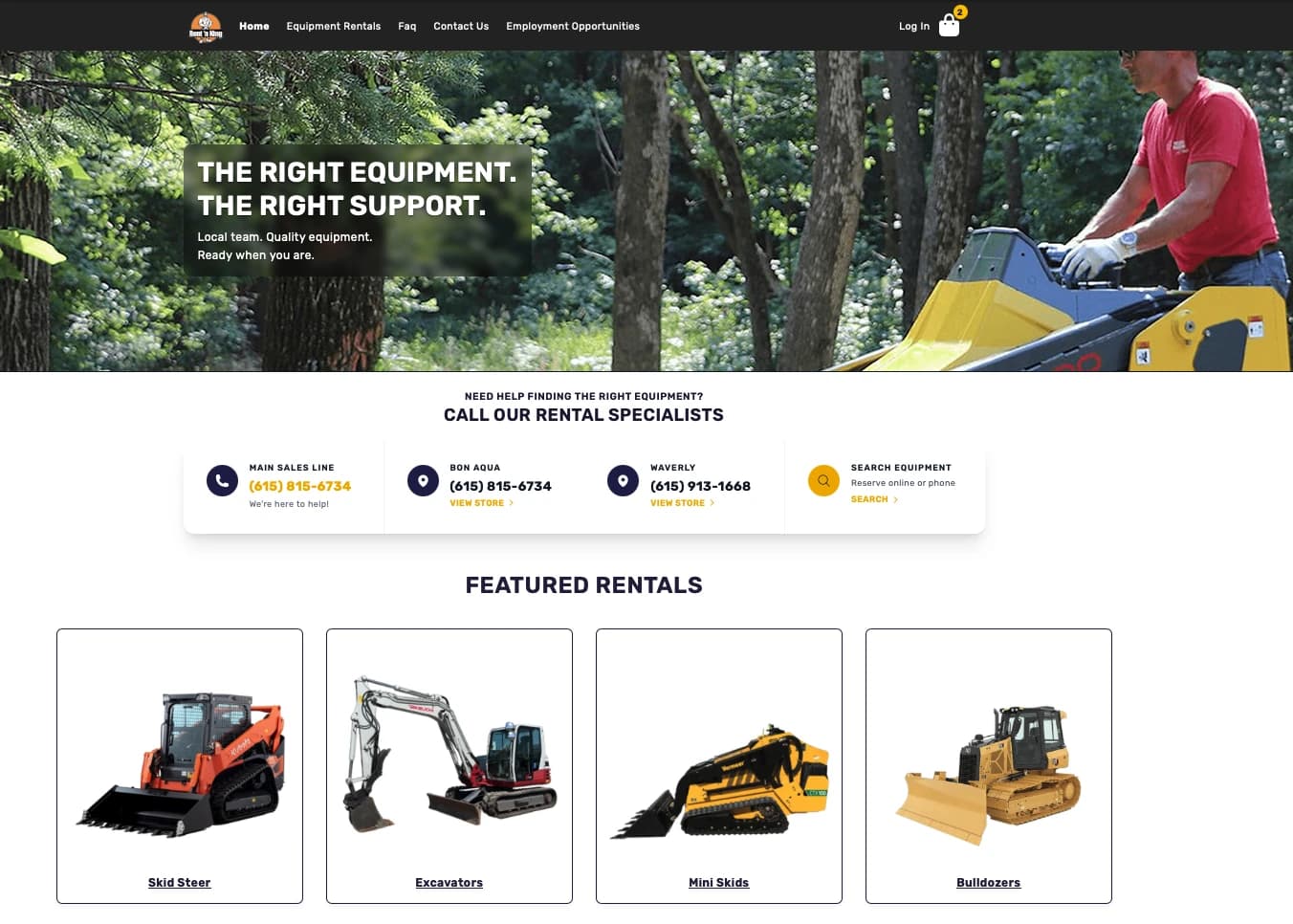
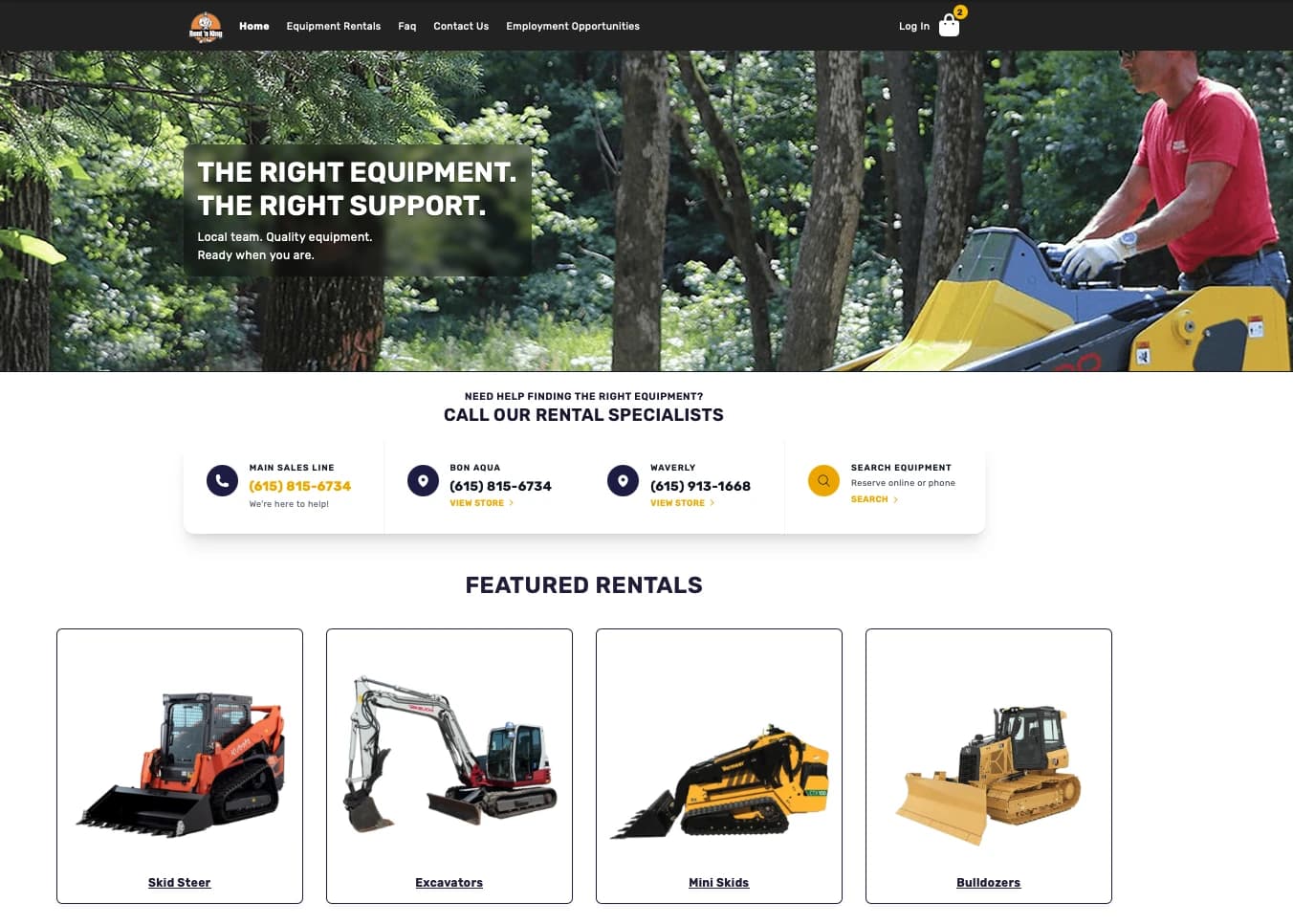
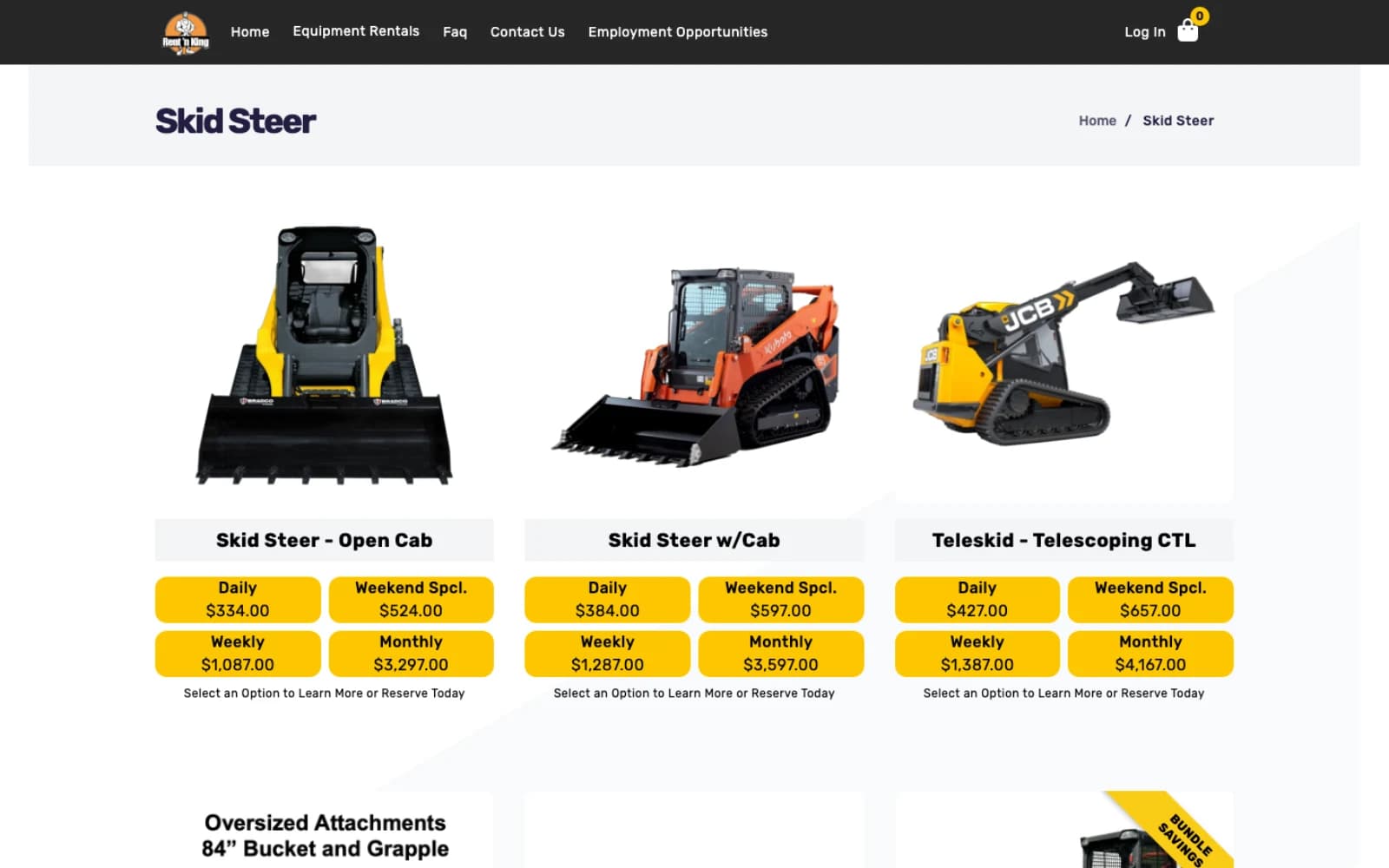
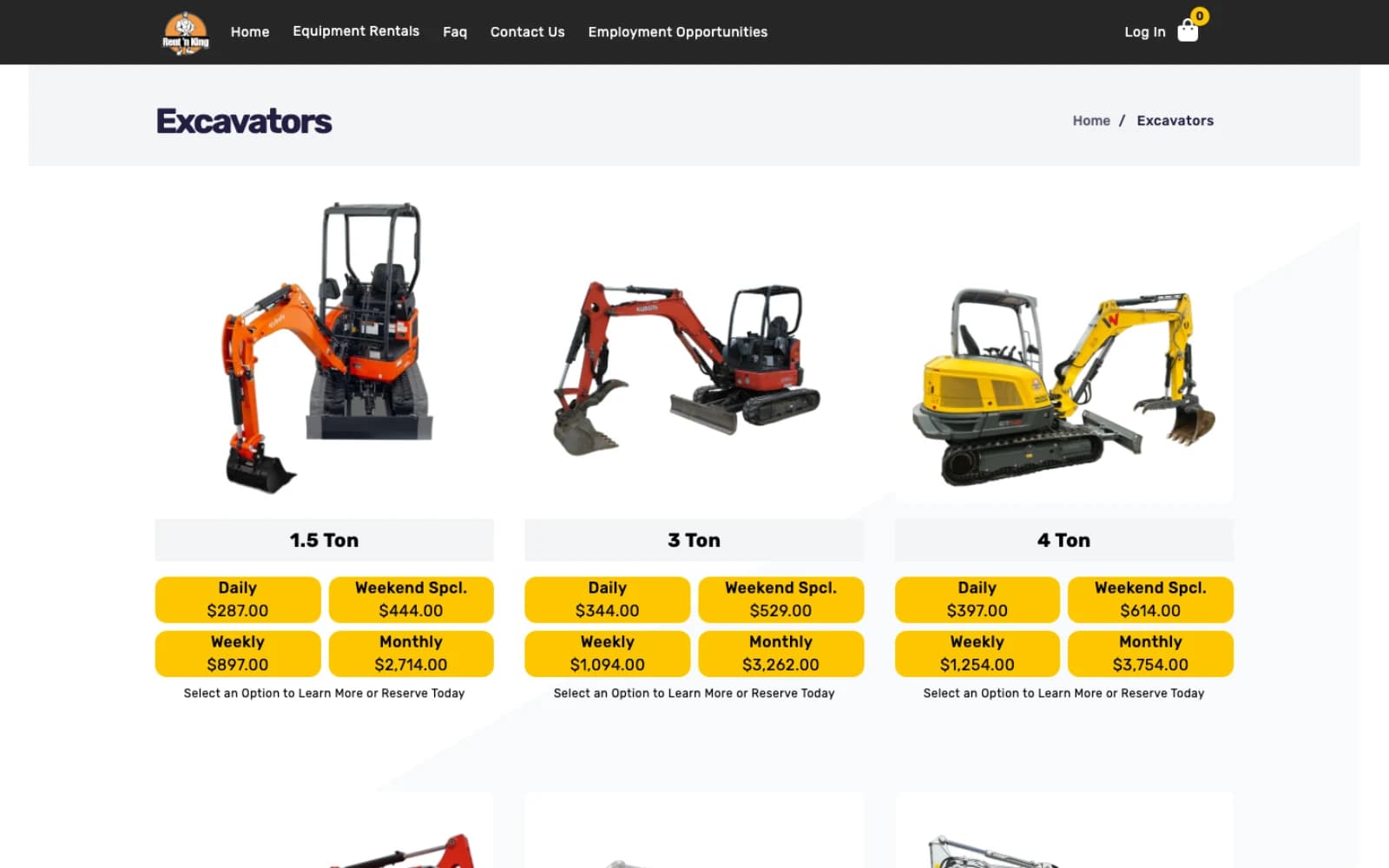
The customer site is built around one task — helping contractors get the equipment they need for the job in front of them. Local numbers, per-store lookup and a search-first entry to the catalog sit above the fold, with four rental periods (Daily / Weekend Special / Weekly / Monthly) shown on every unit so customers can size the rental to the timeline.
Rental Model
Pricing built around how equipment is actually used.
Rental isn’t a one-time purchase. Every unit on Rent ‘n King is shown with four usage periods so customers can size the rental to the job.
Daily
Same-day / short jobs
Weekend Special
Fri – Mon package
Weekly
Multi-day project
Monthly
Sustained work
Rental Operations
The business side behind every reservation.
Behind the customer-facing site, the operations platform gives the team one working surface — reservations as they arrive, equipment records as they change, deliveries and returns on the schedule, and the shop view that ties it all back to the fleet.
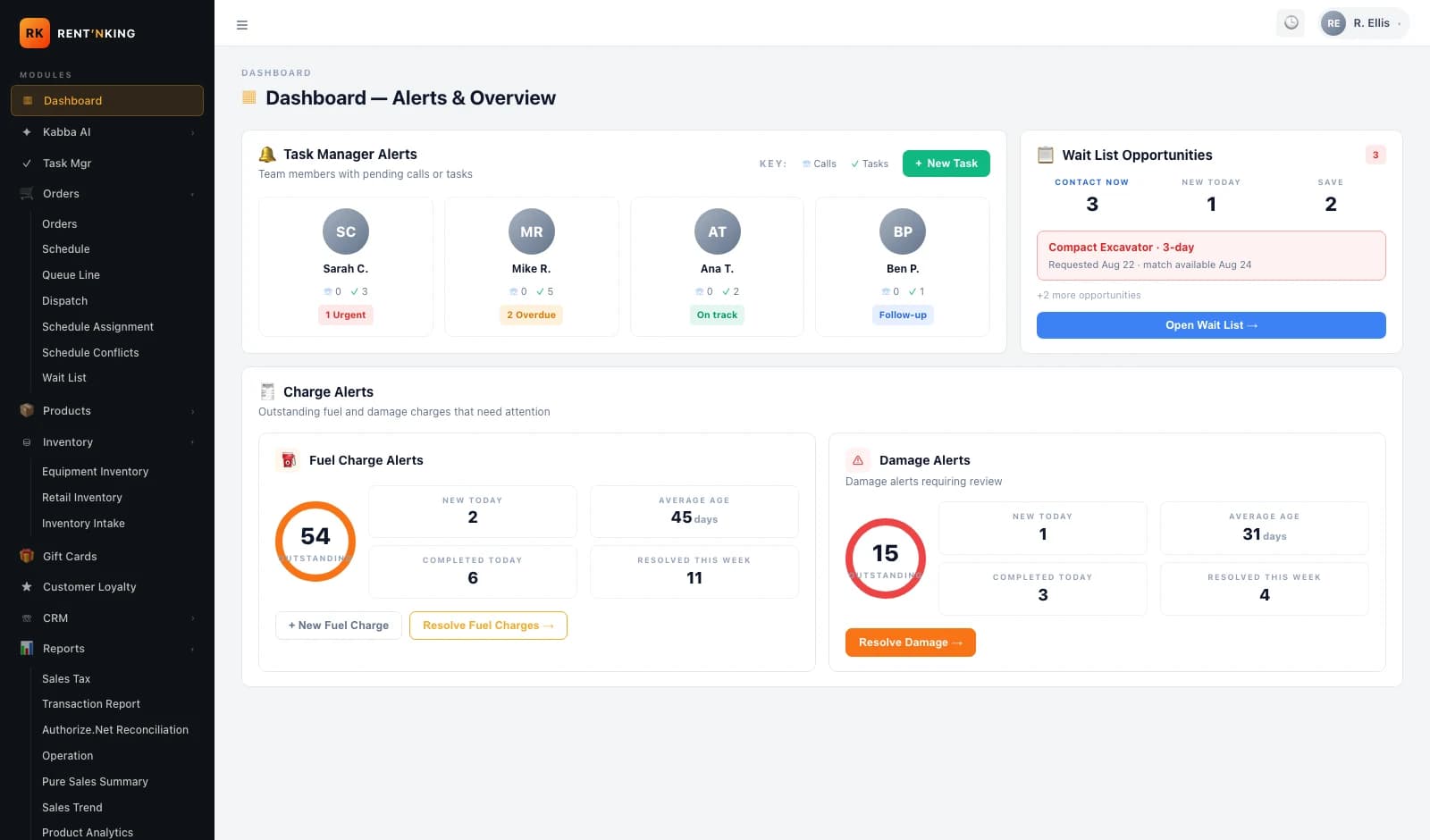
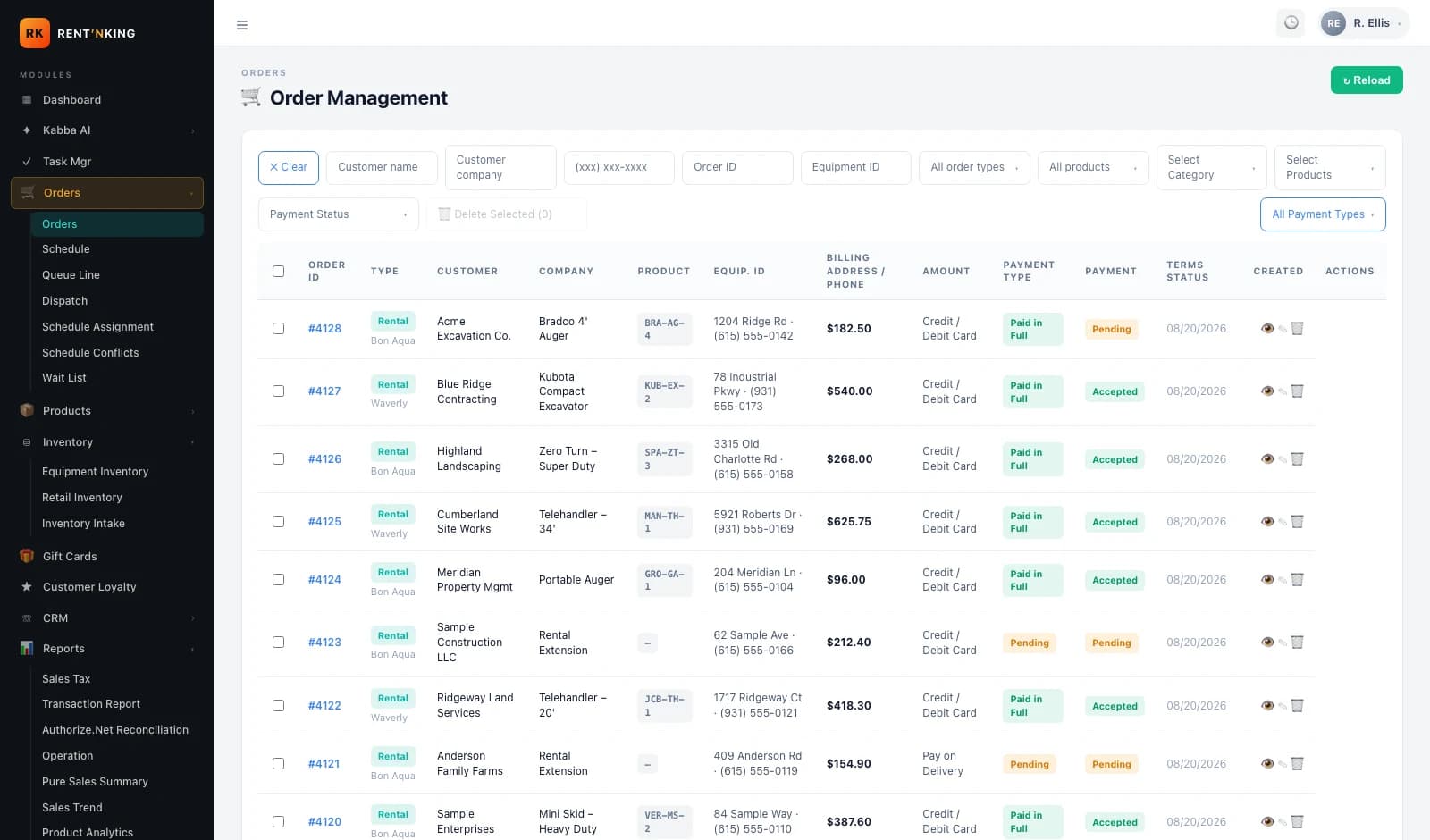
Customer, employee and financial data blurred in every admin screenshot on this page for privacy.
Orders / Reservations
One order queue combining online reservations, in-store rentals, extensions, payment status and terms acceptance — filterable by product, payment type and store.
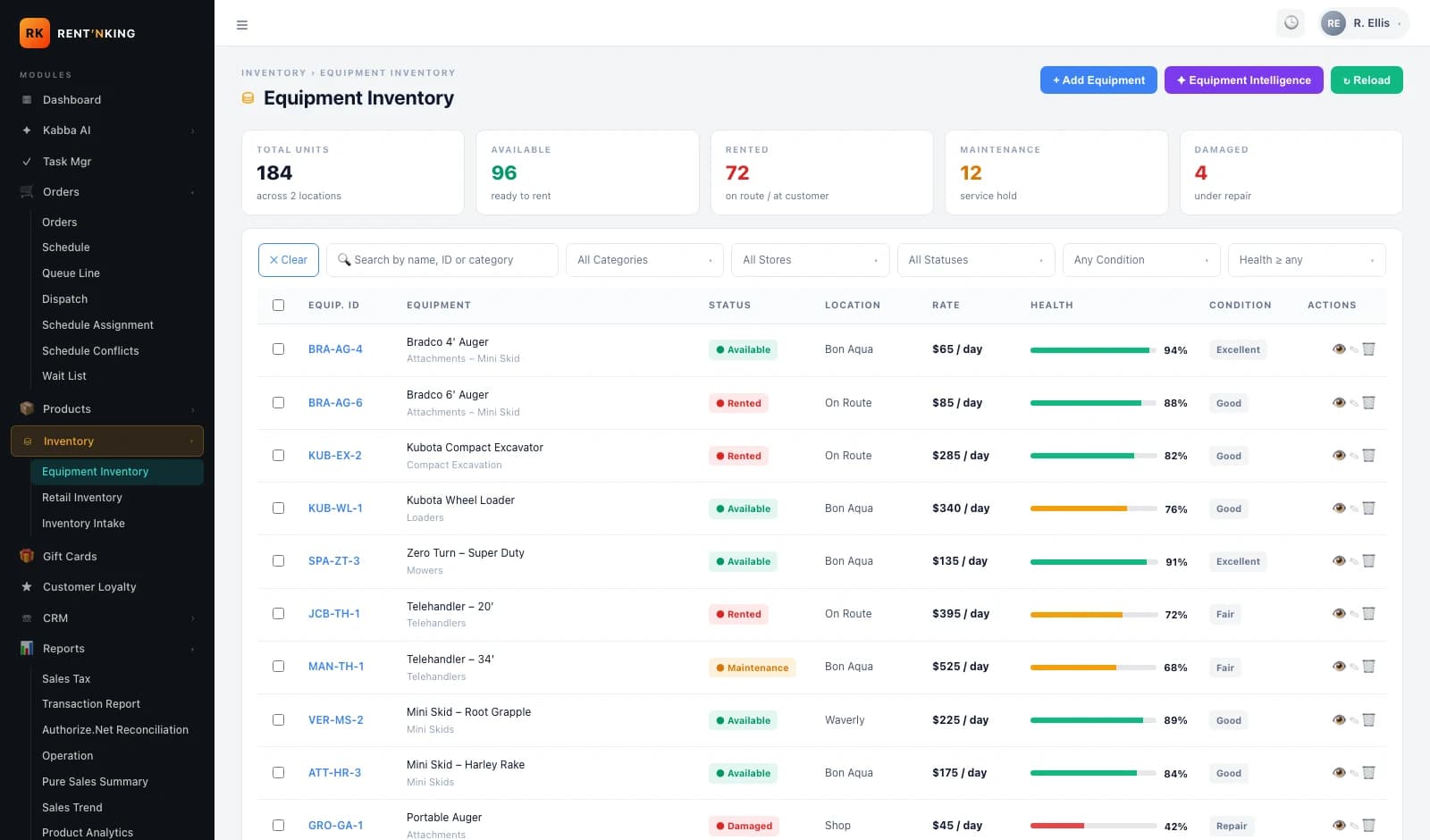
Equipment Inventory
Per-unit records — equipment ID, category, status (Rented / Damaged / Off-Site), assigned location, last order and next scheduled rental.
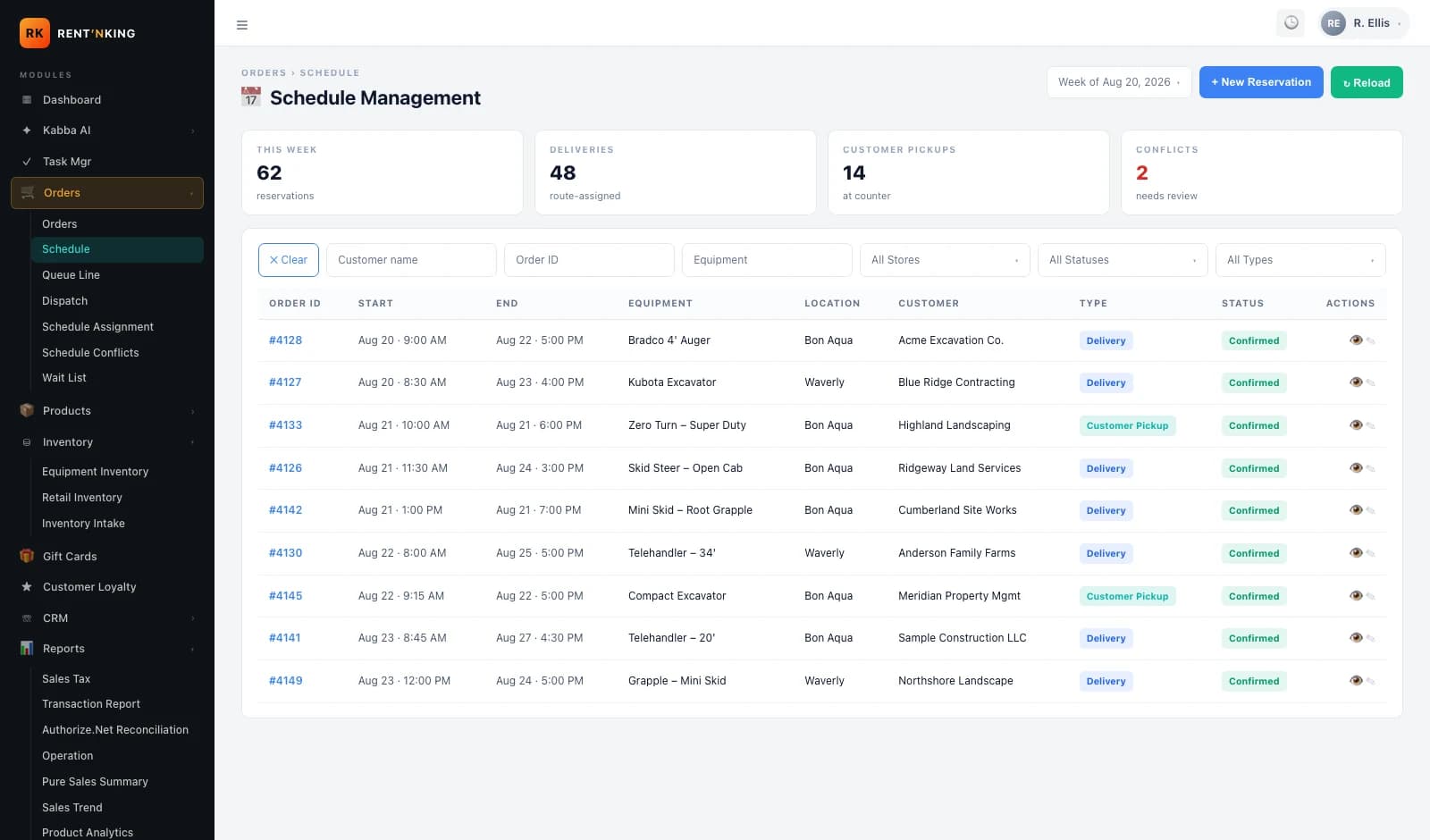
Schedule
Delivery and return orchestration, with per-store filtering, payment status and rescheduling in one view.
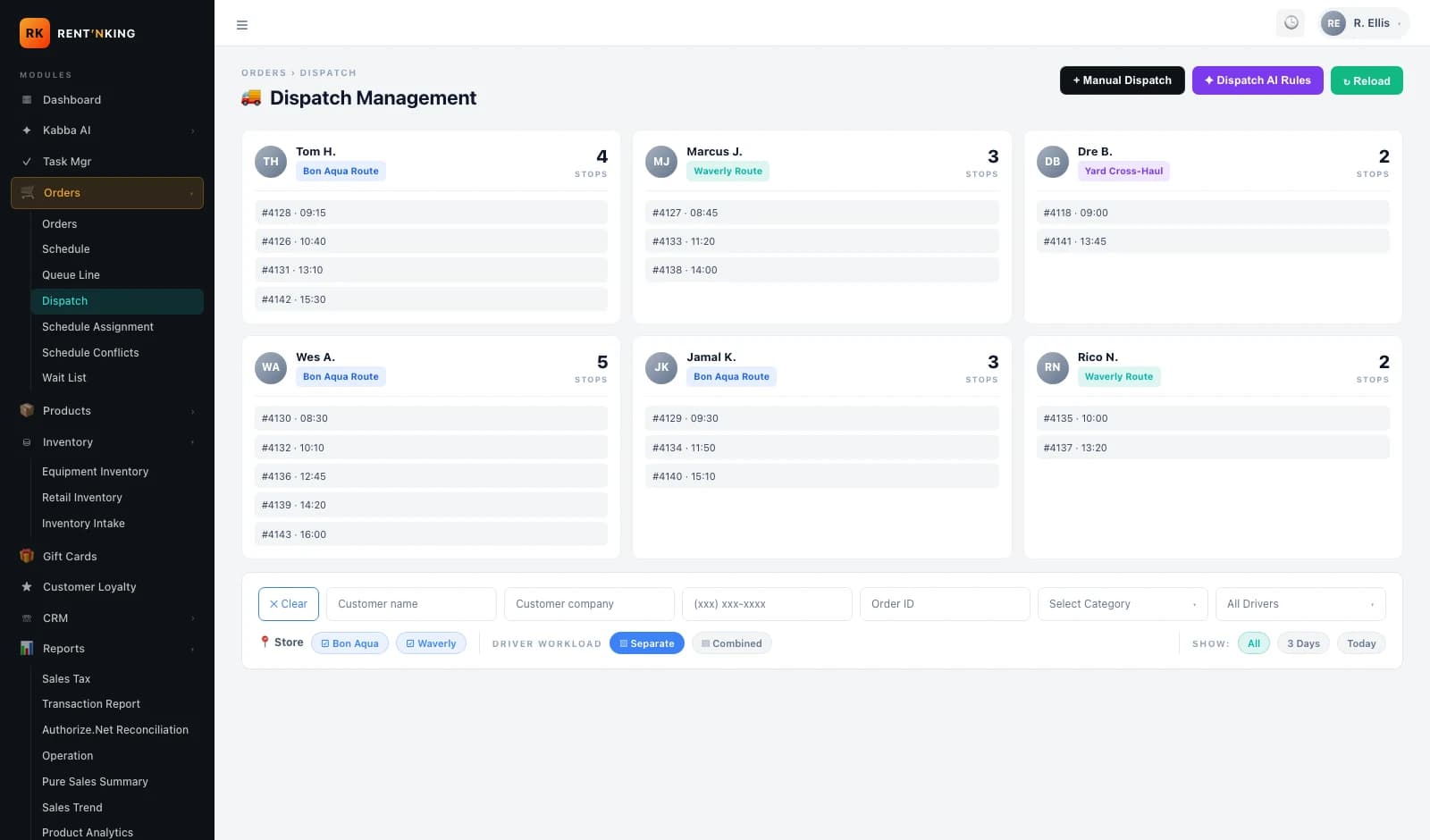
Dispatch
Driver assignment board with an idle-driver panel, split between truck deliveries and in-store pickups.
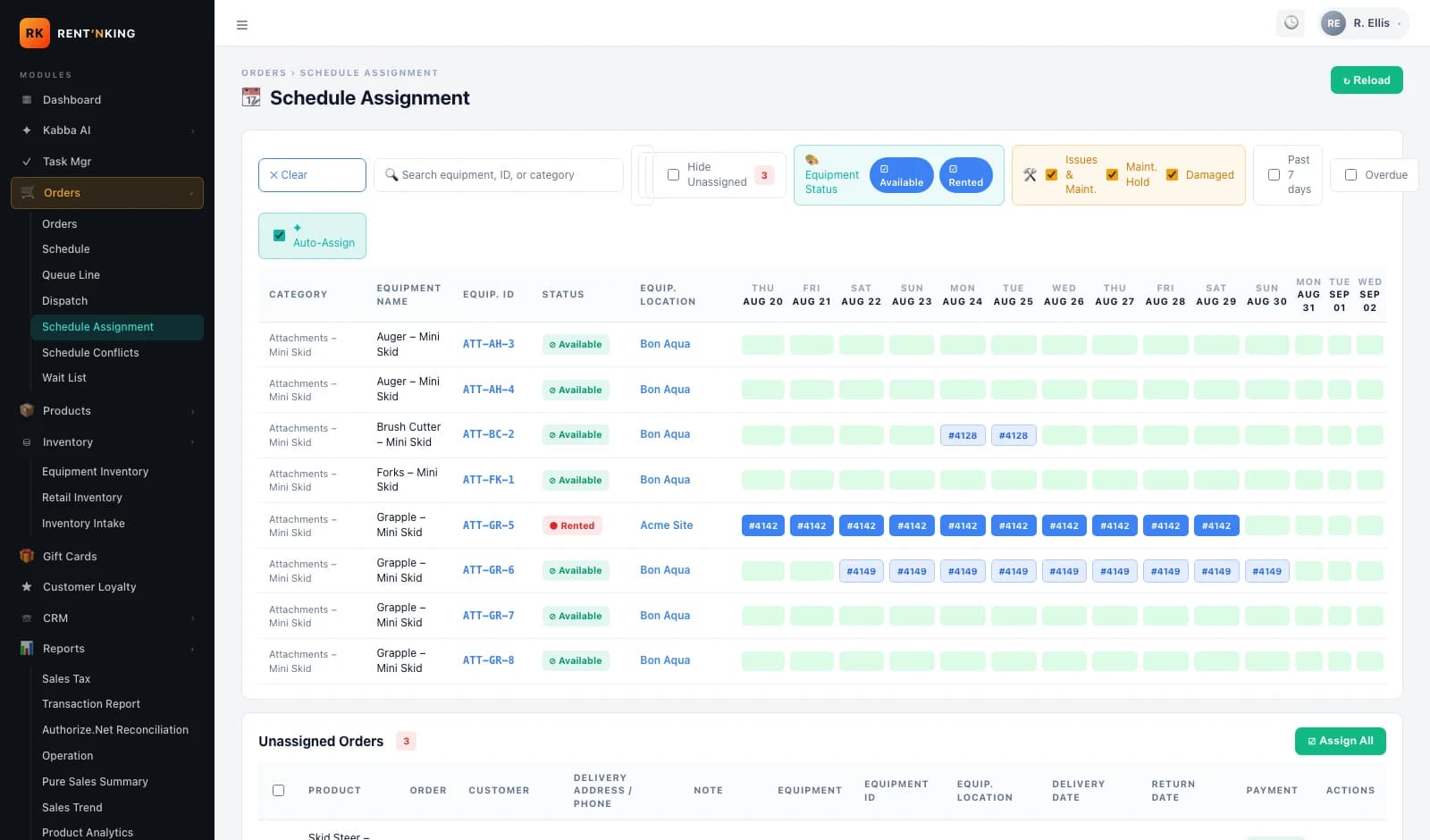
Schedule Assignment
An equipment-by-date grid tying specific units to specific rentals, with an unassigned-order queue and store filters.
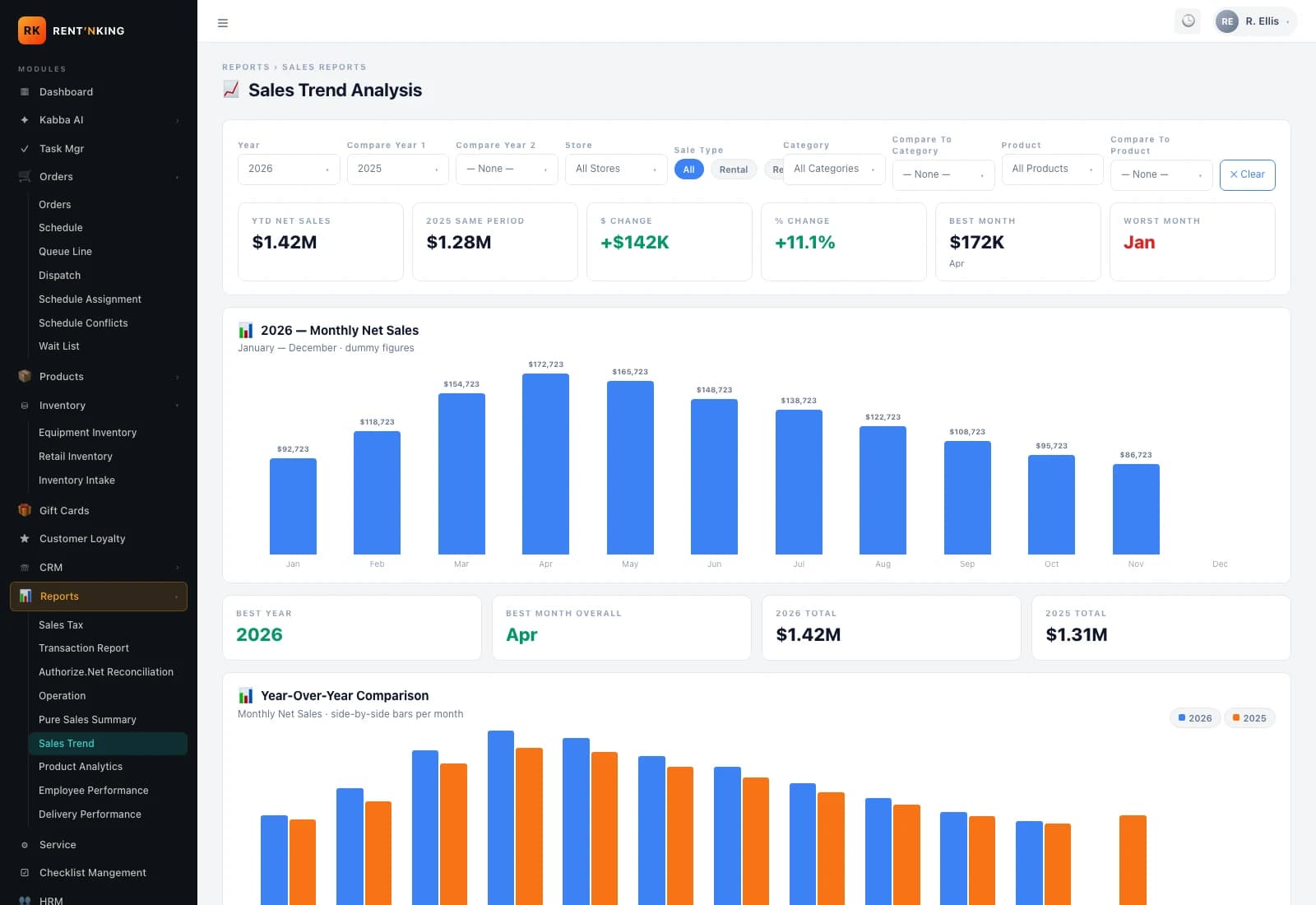
Sales Trend
An operational reporting view — the sales trend screen the team uses to track movement across months and stores.
Checklist Management
Documenting the equipment at every handover.
A rental only works if both sides agree on what condition the equipment was in when it left, and what condition it came back in. The checklist module structures that exchange — a documented delivery inspection, a matching return inspection, and a side-by-side condition review the team can act on.
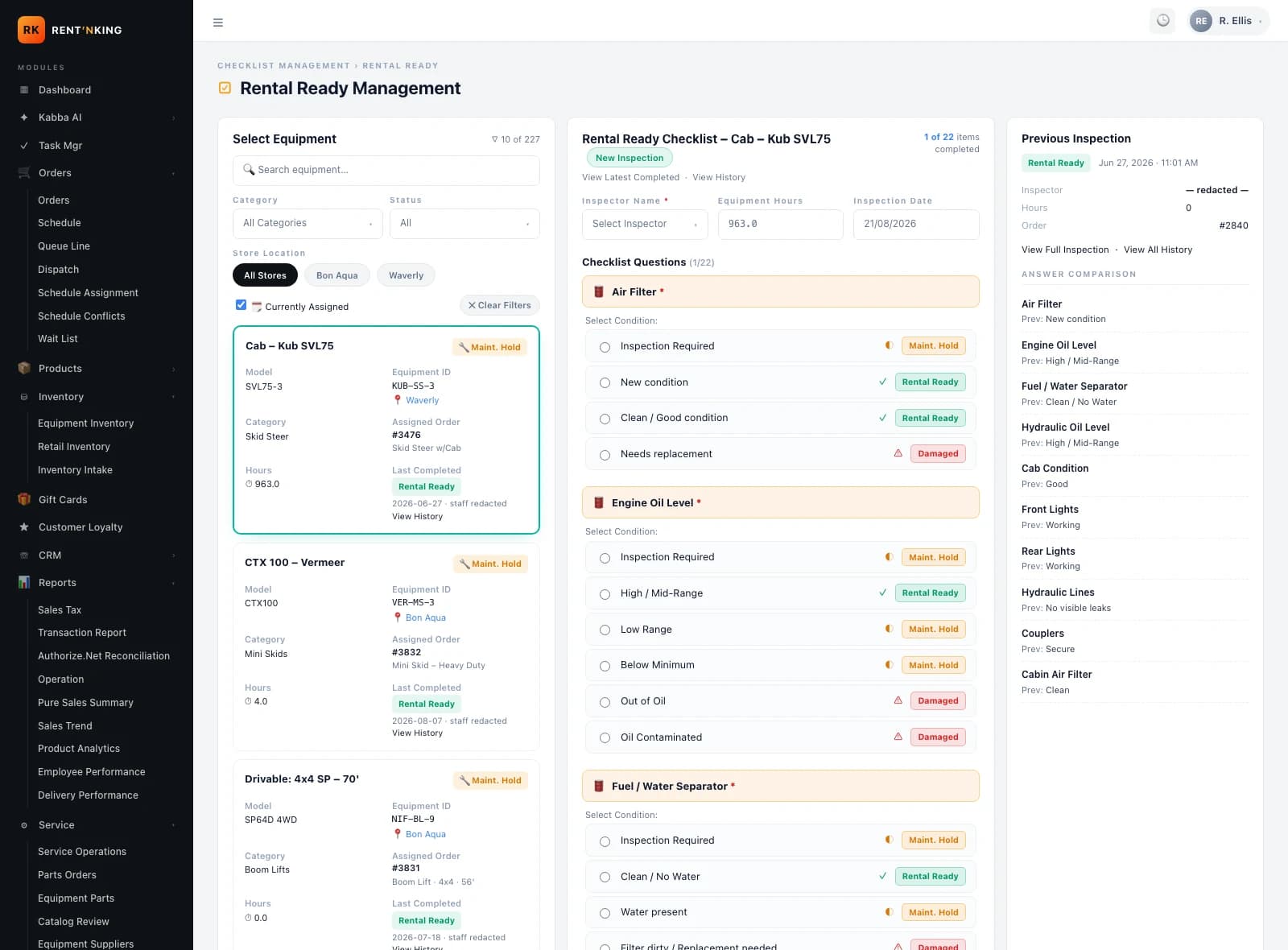
Delivery inspection
At handover, the team runs the equipment-specific checklist and the customer acknowledges the condition — a documented starting point for the rental.
Return inspection
The same checklist runs again at return. Comparing the two makes new damage, missing components or condition changes visible, instead of assumed.
Condition review
Where the return flags something, the operations team reviews it and decides what happens next — a service ticket, a customer conversation, or straight back into circulation.
The checklist records the condition and the customer’s acknowledgment. It does not automatically charge the customer or assign liability — those remain judgement calls the operations team makes during condition review.
Delivery vs Return
Know the condition before it leaves. Know it when it comes back.
During delivery, the driver works through the required inspection points and completes the handover with the customer’s signature. When the equipment returns, the team runs the inspection again — same checklist, same equipment, a new condition record. Comparing the two sides is how new damage, missing components and condition changes surface.
Delivery
Condition on handover
- Tire / track conditionRental Ready
- Controls & instrumentationRental Ready
- Attachments presentRental Ready
- Body panels & paintRental Ready
- Safety items (belts, lights, alarms)Rental Ready
- Fluids & filtersRental Ready
Customer signed at handover — condition acknowledged.
Return
Same checklist, second read
- Tire / track conditionRental Ready
- Controls & instrumentationRental Ready
- Attachments presentMissing
- Body panels & paintNew damage
- Safety items (belts, lights, alarms)Rental Ready
- Fluids & filtersFilter dirty
Return inspection flags items for review — the team decides on service or customer responsibility.
Illustrative condition record · derived from real Rental Ready checklist structure
Condition-tracking workflow
Seven steps between reservation and re-rental
Equipment ready
Equipment marked Rental Ready in inventory.
Delivery checklist
Inspection points completed on site.
Customer signature
Condition acknowledged at handover.
Rental period
Machine on the job.
Return checklist
Same inspection, second time.
Condition review
Compare delivery vs return.
Service or ready
Service flow, or back into circulation.
Service Operations
Rentals create wear. The platform helps manage what happens next.
Every rental leaves the equipment a little further from Rental Ready. Service Operations is where the shop lead, the technicians and the office see the same picture — what’s being worked on, what’s blocked, and what’s ready to go back into circulation.
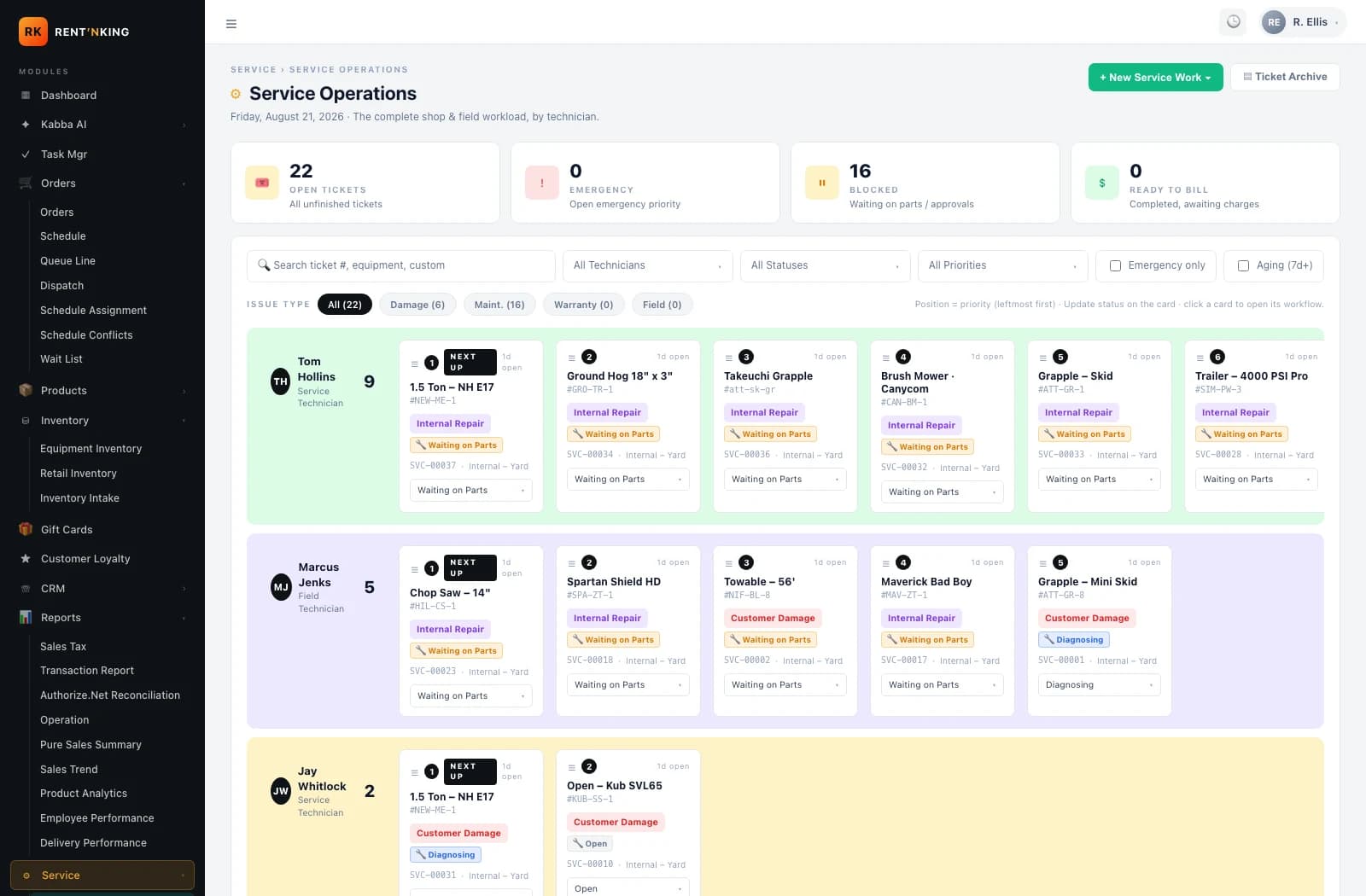
Shop-wide status at a glance
Open Tickets, Emergency, Blocked and Ready to Bill sit across the top of the board — one glance tells the shop lead where the day stands.
Grouped by technician
Every open ticket sits in the row for the technician who owns it, with an Unassigned · Intake lane at the bottom for work that still needs to be routed.
Every ticket carries context
Every card shows the equipment, the equipment ID, the issue type (Internal Repair, Customer Damage, Warranty, Field) and the SVC number — nothing lives only in one person's head.
Inspection feeds operations
Return checklist
Condition flag
Condition review
Service ticket
Back to Rental Ready
How Rent ‘n King Works
The full journey of a single rental.
From a customer’s first search to the equipment being ready for its next rental — one workflow, one platform, ten steps.
Discover
Customer finds equipment on rentnking.com
Reserve
Reservation enters the operations queue
Prepare
Office confirms unit + schedule
Delivery Checklist
Inspection completed at handover
Customer Signature
Condition acknowledged in the field
Rental Period
Equipment is on the job
Return Checklist
Second inspection at return
Condition Review
Delivery vs return compared
Service If Required
Ticket opened, unit held
Ready For Next Rental
Back into Rental Ready inventory
Office · Admin Platform
Reservations, checklist templates, equipment records and service tickets are all managed centrally by the operations team.
Customer web · Operations admin · Field workflow
Field · Delivery & Return
Drivers work through the inspection checklist and the customer signature step at delivery and return, all tied back to the same rental record.
Technology Stack
What’s verified, and what isn’t.
Rent ‘n King’s confirmed surfaces are a public web application, an internal admin platform, a backend API and a database that persist the reservation, equipment, inspection and service records. Field workflows for drivers run on that same platform at delivery and return. Specific frameworks and services appear here only once they’re verified against the repos.
Customer Web
- rentnking.com — public rental catalog
- Category pages, reservations, customer login
Admin Platform
- Internal operations application
- Orders, equipment, schedule, dispatch, checklist, service
Backend / API
- Shared services layer
- Powers both the public web and the admin platform
Database
- Persists reservations, equipment, customers
- Inspection and service records tied to the same units
Field Workflow
- Delivery + return inspections in the field
- Form factor (mobile / tablet) not published
Infrastructure & Integrations
- Hosting and payments live in production
- Specific vendors not published without verification
Not published without source verification: Specific frontend framework, backend runtime, database engine, authentication, payment provider, hosting infrastructure and third-party integrations are not listed until the repositories are inspected. Everything above is a product surface confirmed in the live application.
Challenges & Solutions
What we ran into, and how we solved it.
Connecting digital to physical
Problem
A reservation on the site had to end with a piece of steel arriving at a specific job site at a specific time. Any drift between the online record and what was actually going out of the yard turned into a phone call.
Solution
We built the reservation and the dispatch board on the same underlying record. The order a customer places is the order a driver leaves with — no re-entry between systems.
Recording equipment condition without slowing anyone down
Problem
Every rental needs a documented condition record, but a checklist that takes twenty minutes to fill in won't get used at the truck door. The team needed something structured enough to trust, and quick enough to actually run.
Solution
The checklist is equipment-type specific, the previous inspection sits alongside the current one for reference, and the customer signature step closes out the delivery in the field — the whole flow stays in one place.
Returning equipment to service — cleanly
Problem
A unit flagged at return could easily fall between the return desk and the shop — sitting in the yard while the next customer waits on it.
Solution
A flagged return can move directly into a Service Operations ticket, held out of Rental Ready inventory until the shop marks it back in — so the fleet view and the shop view stay in agreement.
Connecting reservation, delivery, return and service into one workflow was a custom software project — off-the-shelf rental tools would have covered the booking, but left the operational middle to spreadsheets.
Results
Outcomes we can speak to directly.
Rent ‘n King is a live operating business — the numbers are theirs, not ours to publish. What we can describe is the shape of what changed once the platform went live.
Customer reservations online
Contractors can find the right unit, understand the rental options and start a reservation without needing to call — while the phone stays the right entry point for anything the site doesn't answer.
Operational visibility
Reservations, deliveries, equipment status and service tickets are all visible in one platform — the office no longer assembles the picture from separate tools.
Documented handover
Delivery and return each create a structured condition record tied to the order and the specific unit — the team isn't relying on memory for what a machine looked like a week earlier.
Equipment readiness
Units that need attention move into the shop queue instead of back into circulation — the customer picking up the next rental gets a unit the team has actually cleared.
Product Showcase
The product across the rental lifecycle.
Customer Experience

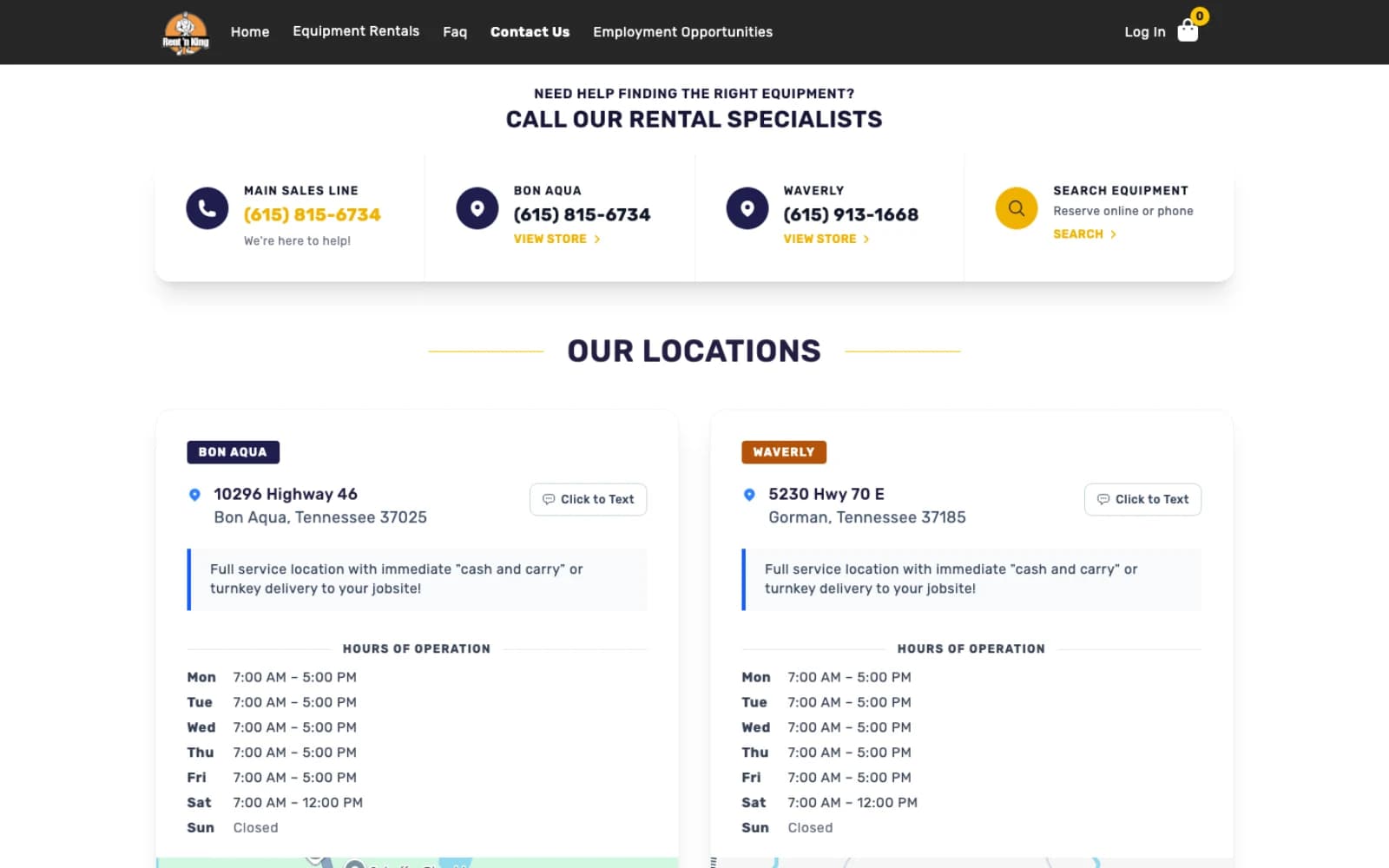
Rental Operations
Checklist Management
Equipment Lifecycle
Rent ‘n King Case Study FAQs
Quick answers about the Rent ‘n King project.
What is Rent 'n King?
Rent 'n King is an equipment rental company operating in Tennessee. They own and rent out earthmoving, aerial, land-clearing and site-support machinery to contractors and homeowners from two locations, Bon Aqua and Waverly. Rent 'n King is a direct rental business operating its own fleet — not a peer-to-peer marketplace.
What did CoreDron build for Rent 'n King?
CoreDron built an equipment rental management platform that combines the customer-facing rental website (rentnking.com), an internal admin application for the operations team, and field workflows used at delivery and return. Reservations, equipment, deliveries, inspections and service records all live on the same platform.
How does the rental workflow work end-to-end?
A customer discovers equipment on rentnking.com and reserves it. The operations team prepares the unit, delivers it, runs a delivery inspection with the customer, and captures a signature. During the rental period, the reservation and any status changes stay attached to the order. On return, staff run the same inspection again — a side-by-side condition comparison surfaces any changes so the team can decide whether the unit is Rental Ready or needs the shop.
How do delivery and return checklists work?
The team runs an equipment-type-specific inspection at delivery, with the customer acknowledging the condition, and the same inspection again at return. A side-by-side view of the two makes condition changes visible so the operations team can review them and decide the equipment's next state — back to Rental Ready, or into Service.
Does the system support equipment condition and service workflows?
Yes. Rental equipment moves out of Rental Ready condition over time. Service Operations tracks which units are being worked on, which are blocked and which are ready to go back into circulation, so the fleet the team is offering to the next customer is a fleet they have actually cleared.
Can CoreDron build similar rental-management software?
Yes. Rent 'n King is a custom software engagement — reservations, delivery, return, condition documentation, signatures and service operations connected as one workflow. If you're operating rental equipment (or any physical asset that goes out and comes back), CoreDron can build the platform your operations team actually needs.
Discuss Your Rental Platform
Building software around a real rental operation?
If your team is stitching a rental business together out of spreadsheets, off-the-shelf booking tools and separate service software, we’d be glad to talk through the shape of the problem — and where a custom platform would actually earn its place.
Keep Exploring