
OTT Platform · Web · Mobile · Apple TV
Almoosawi TV
قناة مسجد الموسوي الكبير
Broadcasting across web, mobile & television.
Almoosawi TV brings programming from the Grand Al-Mousawi Mosque in Basra to audiences on the web, the Flutter mobile app and a native Apple TV app. CoreDron designed and developed the website and mobile broadcasting experience during a Jan 2022 – Apr 2024 engagement.
- Client
- Alarbash
- Industry
- Broadcasting / Media
- Engagement
- Jan 2022 – Apr 2024
- Type
- OTT · Streaming
Project Overview
From a broadcast channel to a multi-screen digital experience.
Almoosawi TV is the digital broadcasting channel of the Grand Al-Mousawi Mosque in Basra — carrying its programming beyond the mosque itself and onto the platforms audiences already use.
CoreDron was engaged to build the web and mobile side of that broadcasting model. The result brings together web access, a Flutter cross-platform mobile app, and a native Apple TV app as one connected OTT product.
Clutch records the engagement goals as building the website and mobile app, with the project scope described as OTT development.
Web
Broadcasting Website
Mobile
Flutter · iOS + Android
TV
Native Apple TV
Engagement
Jan 2022 – Apr 2024
Project Snapshot
One broadcast channel across web, mobile and television.
- Industry
- Religious Media / Broadcasting
- Project Type
- OTT & Streaming Platform
- Platforms
- Web · iOS · Android · Apple TV
- Services
- Web · Mobile App · OTT Development
- Project Scope
- Streaming · Mobile · Web · TV Experience
- Technology
- Web · Native Mobile · tvOS · Streaming / Media
The Challenge
One Broadcast Experience Across Very Different Screens.
A broadcast that lives on a laptop browser, a phone in someone’s pocket and a television across the room has to behave differently on each — while still feeling like the same channel to whoever’s watching.
Streaming Across Devices
Audiences reach the channel from a laptop, a phone and a television. The same programming has to render, navigate and play back cleanly on each — not just work well on one and get tolerated on the rest.
Listening Beyond the Video Screen
A lot of viewers want the broadcast to keep going while they do something else on their phone. That meant designing mobile playback around audio-first continuity, not just full-screen video sessions.
A Better Living-Room Experience
Television uses a remote, not a touchscreen — a quieter, leaned-back moment than a phone. The Apple TV surface needed a navigation model built for that room, not a phone layout stretched to fill a bigger screen.
Our Solution
Bring the Broadcast to the Screen the Viewer Is Already Using.
We built Almoosawi TV as one connected product with a different front door for each screen — a browser-based destination for the desktop moment, a Flutter mobile app for the on-the-go moment, and a native Apple TV app for the living-room moment. The channel is the same behind all of them; only the way each screen presents it changes.
Playback was designed around how audiences actually listen. Background audio and Picture-in-Picture on iOS let a programme keep going while the phone moves on to something else, and the tvOS build keeps navigation calm and remote-friendly on the television.
Key Capabilities
Six ways the channel reaches the audience.
OTT Streaming
Live and recorded broadcast delivered as an OTT product — one channel that plays back across browsers, phones, tablets and the television, with no install needed for anyone who just wants to watch.
Mobile Viewing
The Flutter mobile app runs on iOS and Android from a single codebase, bringing the channel to the device already in the audience's hand — live broadcast, recorded programming, and searchable audio and video libraries, all in one place.
Background Audio
On iOS the broadcast keeps playing when the viewer leaves the app — supported by the v1.2 App Store release notes, so listeners can keep the programme going while they use the phone for something else.
Picture in Picture
Video continues in a compact iOS player while the viewer moves through other supported apps — a small window that stays on top, so the broadcast doesn't have to end the moment attention shifts.
Apple TV
A tvOS build carries the same channel into the living room, with a remote-first navigation model built for a leaned-back viewing session rather than a touchscreen layout stretched to fill the TV.
Web Access
Almoosawi.tv gives the channel a direct browser destination — no app, no store gate — so first-time viewers and desktop audiences reach the same broadcast as the mobile apps.
How Almoosawi TV Works
One Channel, Multiple Ways to Watch.
One broadcast source, three front doors — the browser, the phone in someone’s pocket, and the television in the living room. Each surface fits its moment; the channel behind them stays the same.
Broadcast Source
Grand Al-Mousawi Mosque Channel
Discover
Web
A direct browser destination at almoosawi.tv — no install, no store.
Watch & Listen
Mobile
Flutter app on iOS and Android, with background audio and Picture-in-Picture built in on iOS.
Living Room
Apple TV
A remote-friendly tvOS surface built for a leaned-back viewing session.
Web Broadcasting
A digital home for Almoosawi TV.
The web experience gives audiences a direct browser-based destination for Almoosawi TV — an entry point into the channel’s programming that doesn’t require a mobile app.
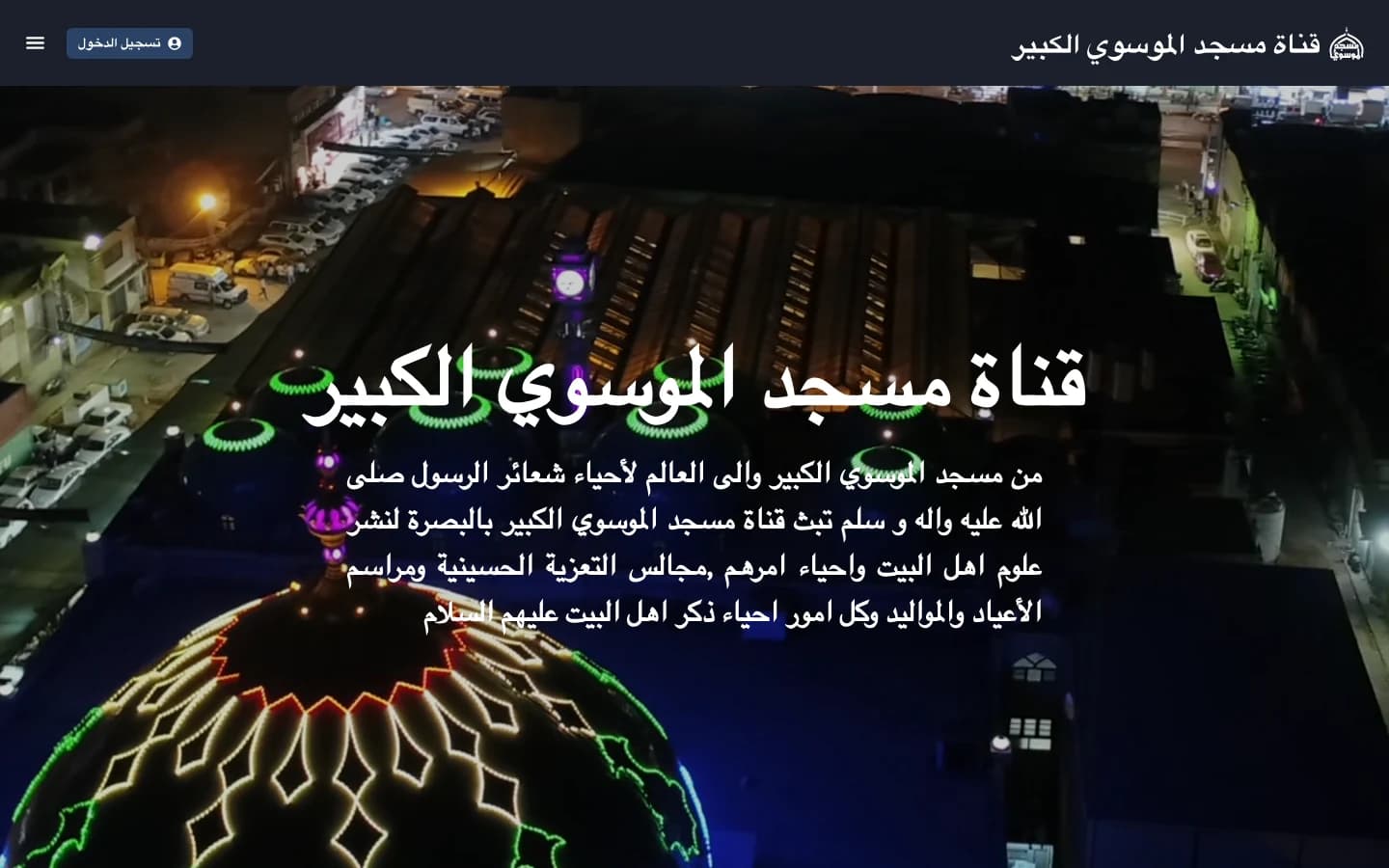
Mobile
The broadcast goes with you.
The Flutter mobile app runs on iOS and Android from a single codebase, extending the channel from the browser into a dedicated mobile experience — a direct route into Almoosawi TV from the device already in someone’s hand.
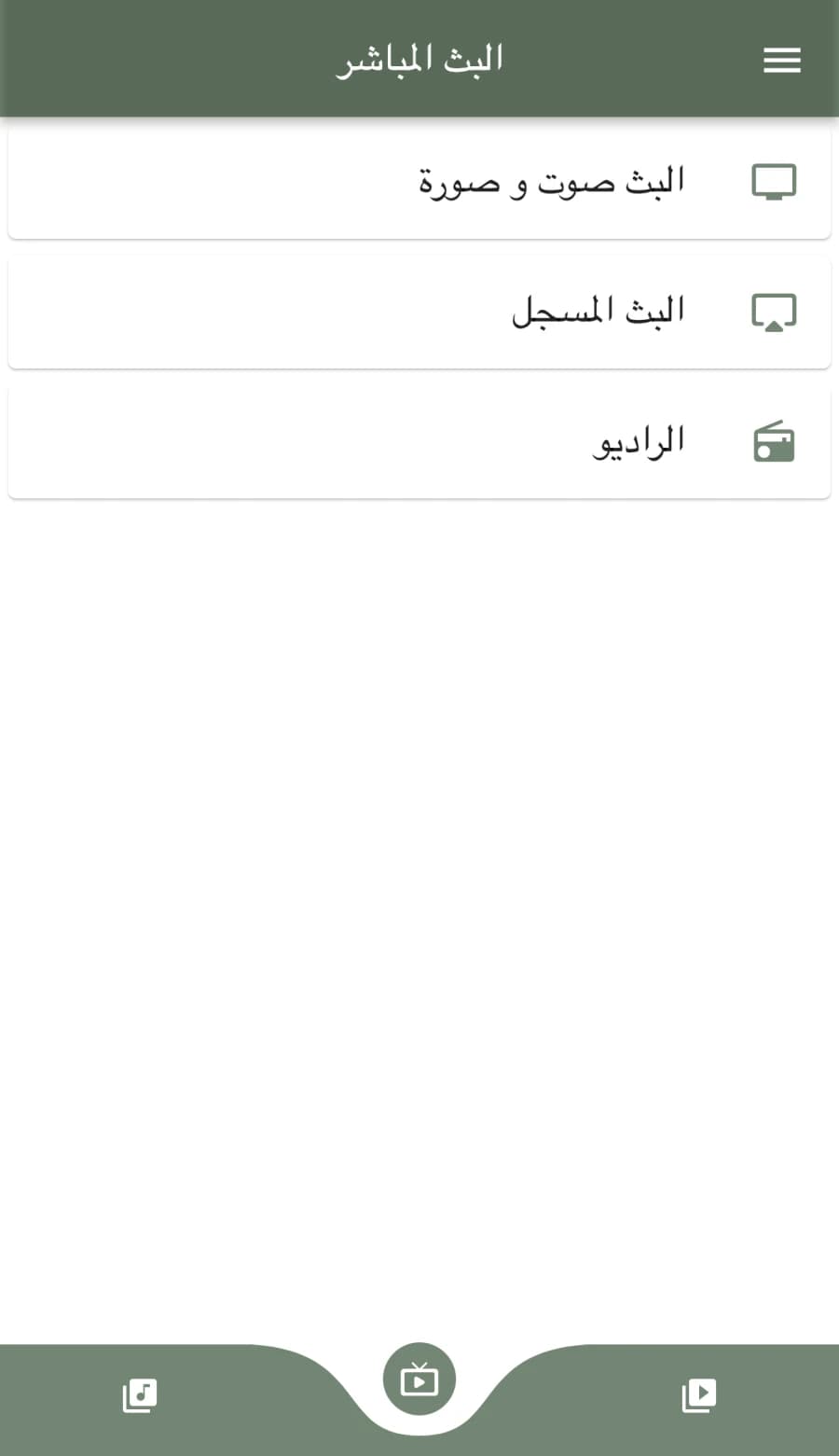
Live broadcast
Audio and video, streamed live straight into the app.
Recorded broadcast + radio
Recorded programming and the radio stream, both available on demand.
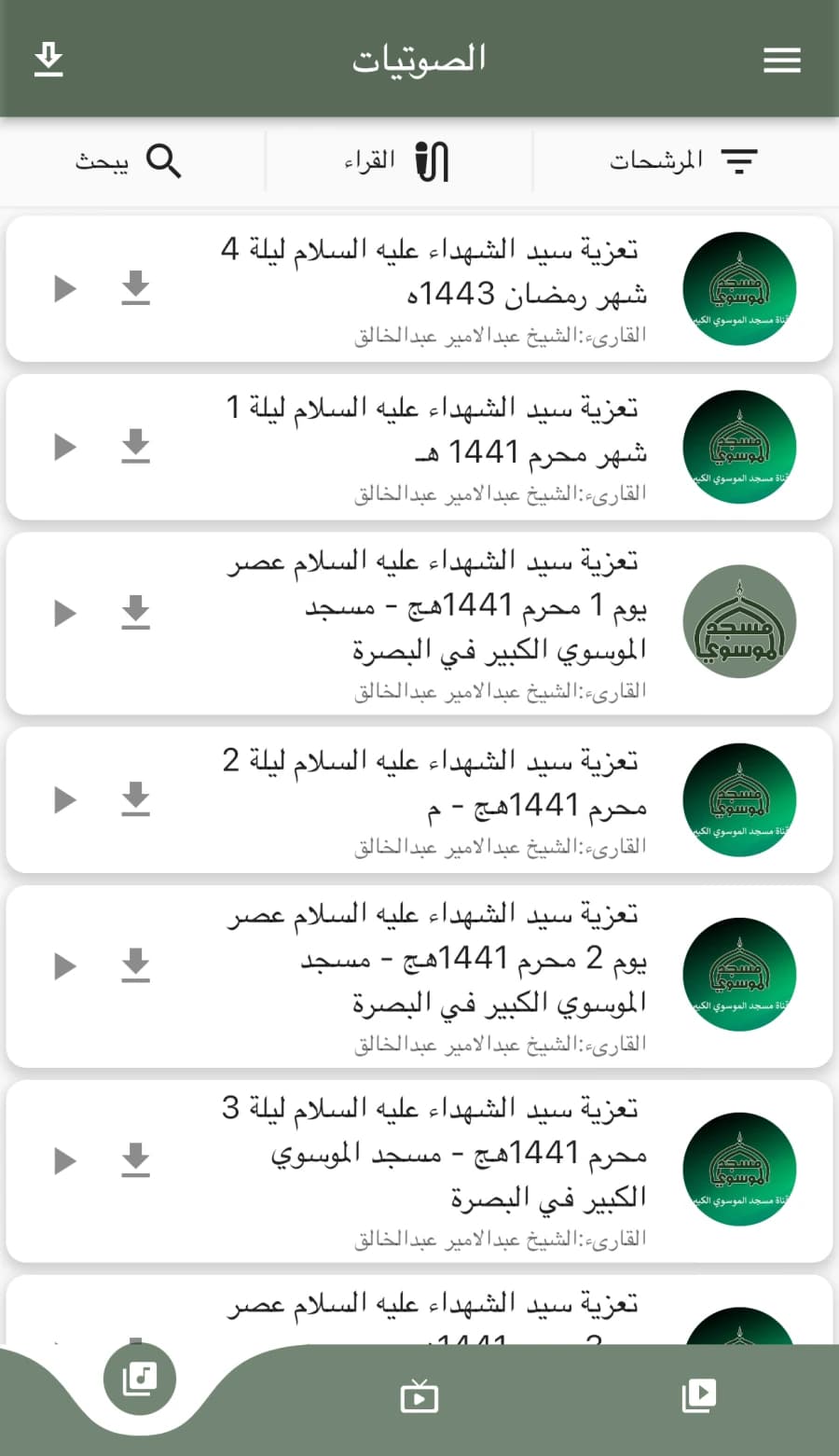
Audio & video libraries
Searchable, filterable archives, with download-for-offline support.
Flexible Playback
Watch When You Can. Listen When That Fits Better.
The mobile experience is built around how audiences actually engage with a broadcast — sometimes a full-screen video session, more often a programme that keeps playing while the phone moves on to something else.
Background audio
Keep listening while moving beyond the main app screen — verified in the iOS v1.2 release notes.
Picture-in-Picture
Continue video playback in a compact player while using other supported areas of iOS — also part of the iOS v1.2 release.
Apple TV
From personal screens to the living room.
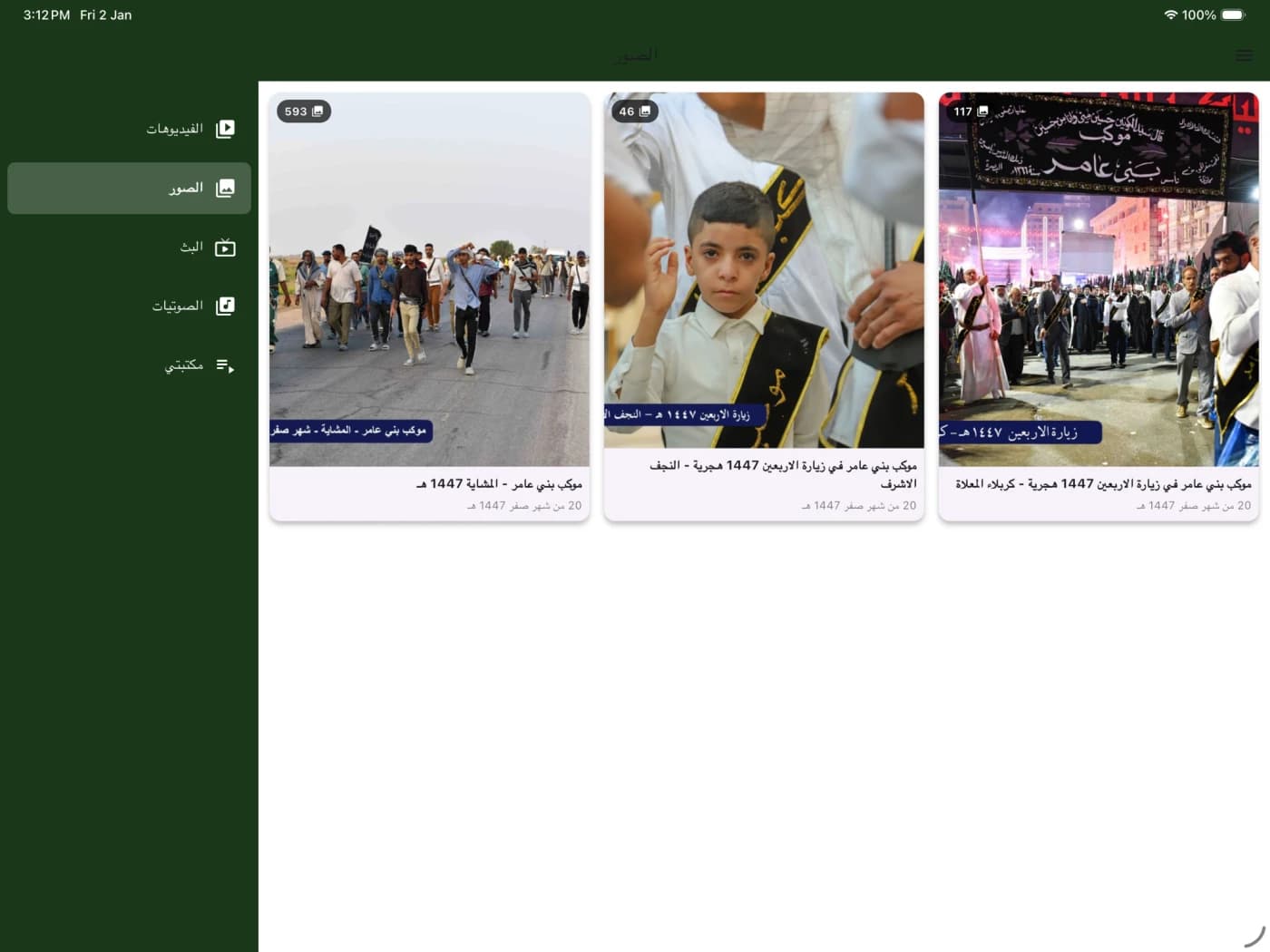
Almoosawi TV reaches the living room through Apple TV, bringing a broadcast-focused product into the environment where television content naturally belongs.
Verified on the current App Store compatibility panel: Apple TV requires tvOS 14.5 or later. The same app is also compatible with Mac (macOS 12+ with Apple M1) and Apple Vision (visionOS 1+).
Technology Stack
What’s verified, and what isn’t.
Almoosawi TV’s confirmed surfaces are a public broadcasting website, a Flutter cross-platform mobile app on iOS and Android, a native Apple TV app on tvOS, and the streaming and backend services behind them. Specific frameworks and vendors appear here only once they’re verified against the repositories.
Web
- almoosawi.tv — public broadcasting website
- Arabic RTL layout with a live video hero
Mobile
- Flutter cross-platform mobile app — one codebase, iOS + Android
- iOS 15+ / iPadOS 15+ — App Store id 6443659089
- Android — Google Play com.almoosawi.atvapp
Apple TV
- Native Apple TV app on tvOS 14.5+
- Same app also runs on Mac (M1) and Vision Pro
- Exact TV-app framework/language not published without source verification
Backend / API
- Shared services layer behind every surface
- Powers the web, mobile and TV clients
Streaming / Media
- Live and recorded broadcast delivery
- Background audio + Picture-in-Picture on iOS
Infrastructure
- Hosting for the site, the API and the media
- Specific vendors not published without verification
Not published without source verification: Specific web framework, the exact Apple TV framework/ language, backend runtime, database engine, streaming provider and hosting infrastructure are not listed until the repositories are inspected. The Flutter mobile stack is confirmed; everything else above is a product surface confirmed in the live application or on its public store listing.
Challenges & Solutions
What we ran into, and how we solved it.
Multiple Screen Sizes
Problem
The same broadcast has to render on a browser window, a phone held in portrait, a tablet in landscape and a television across the room. Any one of those going wrong is enough for the audience to bounce to something that works.
Solution
We built the channel as one product with a different front door per screen — a browser destination for desktop, dedicated iOS and Android apps for mobile, and a tvOS build for the living room, each shaped for its own device instead of a shared layout stretched to fit.
Playback Beyond the Foreground
Problem
A lot of audiences want the programme to keep going while they use the phone for something else. A player that stops the moment the app is backgrounded turns watching into a chore.
Solution
The iOS build supports background audio and Picture-in-Picture — verified in the v1.2 App Store release notes — so the programme keeps playing when the viewer switches to another app, with video able to continue in a compact window instead of ending outright.
Television Access
Problem
Reaching the audience only on personal devices leaves out the room where television content actually belongs — a leaned-back living-room moment that phones and browsers don't replace.
Solution
The Apple TV surface carries the same channel into that room, with a remote-friendly navigation model on tvOS 14.5+, so the broadcast reaches where the family already watches together.
Results
Almoosawi TV Beyond a Single Screen.
The engagement delivered a broadcast that lives in the three places its audience actually watches from — the browser on a laptop, the phone in their pocket, and the television they gather around. It’s one channel with three front doors, not one app spread across three devices.
Web Access
A direct browser destination at almoosawi.tv for viewers who'd rather not install anything.
iOS & Android
A Flutter cross-platform mobile app on both stores, so the channel travels with the audience.
Apple TV
A living-room build on tvOS, carrying the broadcast into the room where television actually belongs.
Flexible Playback
Background audio and Picture-in-Picture on iOS keep the programme going even when attention shifts.
Client Feedback
What the client said.
“We were impressed with their great skills.”
Mohammed Alarbash
CEO, Alarbash · Kuwait
Web & Mobile App Dev · Broadcasting
5.0
Quality
5.0
Schedule
5.0
Cost
5.0
Willing to Refer
Almoosawi TV Case Study FAQs
Quick answers about the Almoosawi TV project.
What is Almoosawi TV?
Almoosawi TV is the digital broadcasting channel of the Grand Al-Mousawi Mosque in Basra. It streams live and recorded programming across a public website, a Flutter cross-platform mobile app on iOS and Android, and a native Apple TV app, so audiences can watch or listen from whichever screen is closest.
What did CoreDron build for Almoosawi TV?
CoreDron designed and developed the broadcasting website at almoosawi.tv and the OTT mobile experience — a Flutter cross-platform app that runs on iOS and Android from a single codebase — together with the native Apple TV app that carries the same channel into the living room.
What platforms does the Almoosawi TV product cover?
The product covers a browser-based web experience, a Flutter mobile app on iOS and Android, and a native Apple TV app on tvOS. The App Store listing also records compatibility with iPad, Mac on Apple Silicon and Apple Vision Pro, all served from the same app.
How does playback work when the viewer moves to another app?
On iOS the broadcast supports background audio and Picture-in-Picture — verified in the v1.2 App Store release notes — so audio continues when the app is backgrounded, and video can keep playing in a compact window while the viewer uses other supported apps.
Is the Almoosawi TV mobile app built with Flutter?
Yes. The mobile app is a Flutter cross-platform application that runs on iOS and Android from a single codebase — not two separately built native applications. The Apple TV app is a separate, native build on tvOS.
Is there an Apple TV application?
Yes. Almoosawi TV ships as a native Apple TV app on tvOS 14.5+ alongside the mobile app and the browser experience at almoosawi.tv, so the same channel reaches the living room, the phone in the viewer's pocket and the browser on a laptop from one connected product.
Why Teams Pick Us
Building a streaming or OTT experience?
We build streaming products across web, mobile and TV, shaped around how audiences actually watch and listen.
Web-first broadcasting
Browser-native players and channel destinations that don't require an install.
Cross-platform mobile delivery
Flutter apps on iOS and Android from one codebase, with background audio and Picture-in-Picture support on iOS.
Living-room screens
Apple TV and other big-screen surfaces where television content naturally belongs.
Discuss your OTT project.
Whether you’re bringing a live channel to mobile, an archive to a searchable app, or a fan destination to iOS, Android and the living-room TV, we’d be glad to hear the shape of the problem.
Discuss Your OTT ProjectMore Case Studies
Related work.
A few more case studies from the CoreDron portfolio.

Keep Exploring
Related services.
What we built here is one of many things we ship. Explore the services that power case studies like this.